
MyCookNote: Recipe Finder
Find, save & cook any recipe
Save, find and plan recipes, then send the ingredients to your shopping list.
A recipe organizer app keeps your recipes, meal plan and shopping list in one place. MyCookNote saves recipes from links and pasted text, plans breakfast to dinner, and sends the ingredients to a shopping list in one tap.
MyCookNote screenshots
Swipe →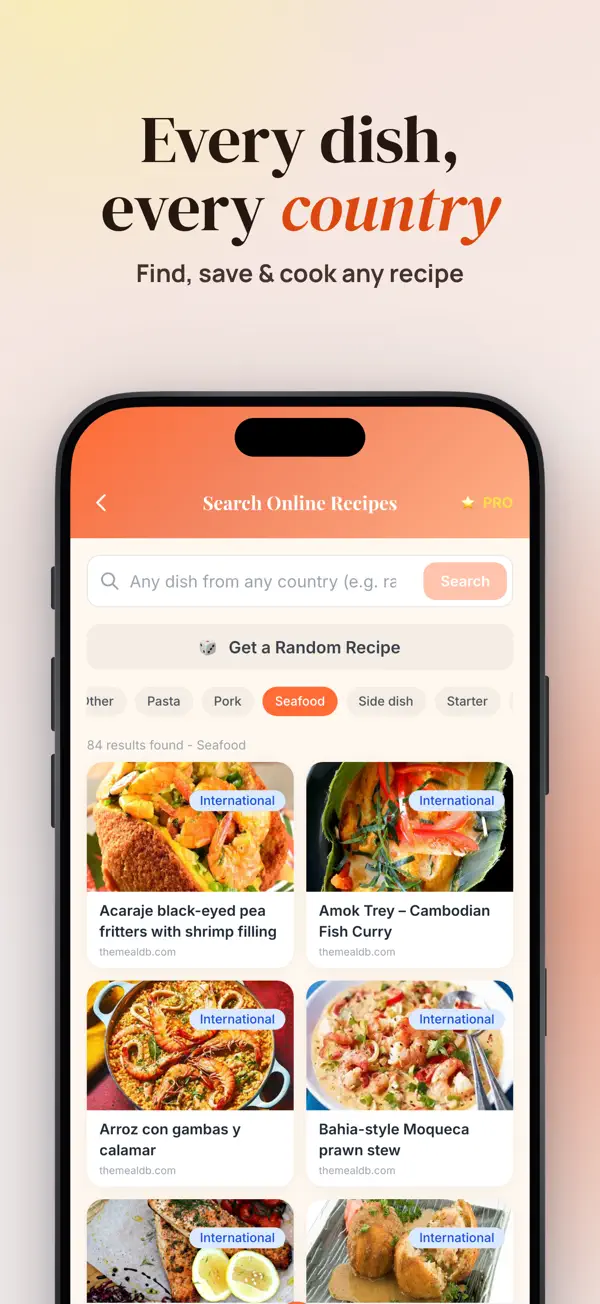


What MyCookNote does
Recipes end up everywhere. Some are in a bookmark, some in a message from a relative, and some on a card in a drawer. When dinner time comes, nobody remembers where the good version was. A recipe organizer gives every dish one home, with the same fields, so you find it fast.
A simple system helps. Give each recipe a title, a number of servings, the ingredients, the steps and a source. Add a few tags, such as quick, vegetarian or dinner. Then plan the week with a small number of meals, reuse ingredients where you can, and check your fridge and cupboard before you write the shopping list.
MyCookNote does these steps on your iPhone. Paste a link from a recipe website and the app reads the ingredients and steps for you. Paste recipe text from a message or note and it becomes a clean recipe card. You can edit every field, including the title, servings, cooking time and tags.
The sections below explain how to save, find, plan and cook with MyCookNote, what the free plan includes, and how your data is kept. The app is free to download, and Pro removes the free limits.
Features
Save recipes from anywhere
- Paste a link from a recipe website and the app reads the ingredients and steps.
- Paste recipe text from a message or a note and turn it into a recipe card.
- Edit the title, servings, ingredients, steps, cooking time and tags.
- Mark favorites and find them again in seconds.
Find any dish
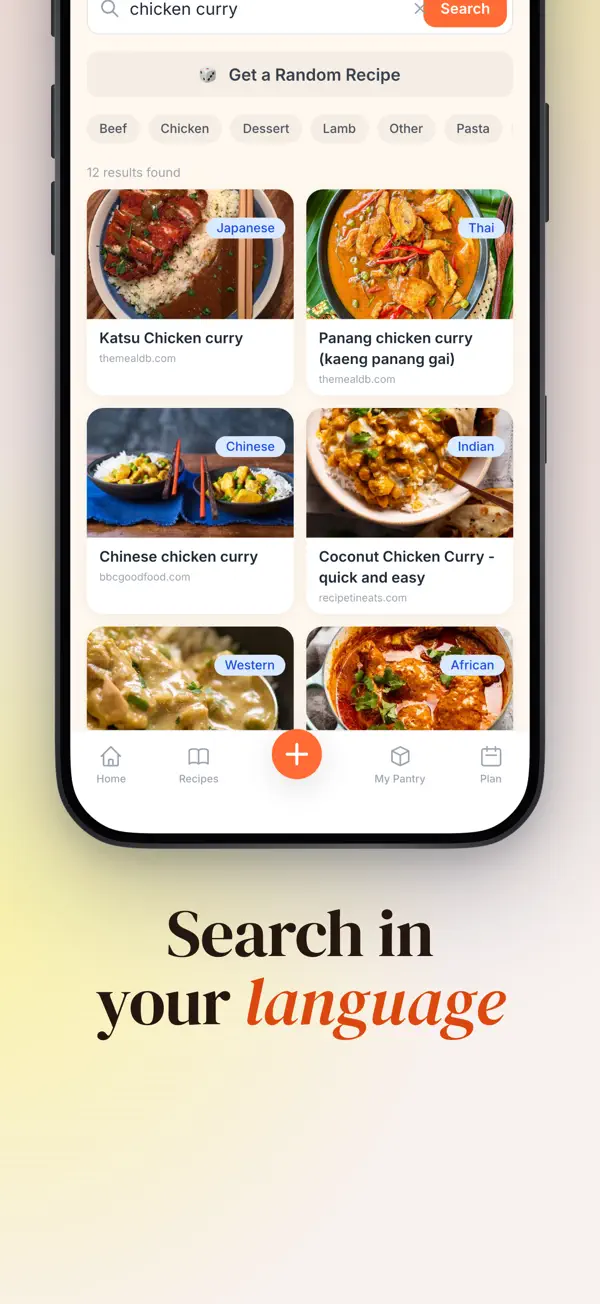
- Search in 15 languages, including dishes from other countries.
- Every result shows its source, so you know where a recipe comes from.
- Tap Random Recipe or browse by category, such as chicken, pasta or vegetarian.
- Compare two recipes side by side before you choose.
Plan the week and shop
- Put recipes in breakfast, lunch, dinner and snack slots in the weekly plan.
- Send all ingredients, or only the ones you need, to the shopping list in one tap.
- Shopping items are grouped by category, so the store trip is faster.
- My Pantry shows which recipes you can cook with what you already have.
Cook step by step
- Cook Mode shows one step at a time in large text and keeps the screen on.
- Start several timers at once and follow them on one dashboard.
- Change the servings and the ingredient amounts update.
- See ingredient substitutions when something is missing.
Kitchen history
- The cooking log keeps the dishes you cooked, with your rating and notes.
- Share a recipe card with family and friends.
- Dark mode for late-night cooking.
Who it is for
- Good for families who cook the same dishes every week.
- Good for people who collect recipes from websites, messages and books.
- Good for shoppers who want a list grouped by category.
- Good for cooks who follow recipes from other countries.
- Good for anyone who wants a meal plan and a pantry check in one app.
Privacy
There is no account and no sign-up. Your recipes, meal plans and lists are stored on your device. When you search online, only the search text is sent to the recipe sources, and the app has no ads and no tracking.
Read the MyCookNote privacy policyPrice
MyCookNote is free to download and has no ads. The free plan includes one online search a day, one recipe from a link a day and five saved recipes a week. Pro removes the limits and is a monthly or yearly subscription, or a one-time lifetime purchase.
Terms of useMyCookNote questions, answered
How do I organize recipes on my iPhone?
Save each recipe as a card with a title, servings, ingredients, steps and a source. Then add tags such as dinner or vegetarian. MyCookNote lets you edit every field and tag, so the recipe book stays consistent as it grows.
Can MyCookNote save a recipe from a website?
Yes. Paste a link from a recipe website and MyCookNote reads the ingredients and steps for you. You can also paste recipe text from a message or note. Check the ingredients and steps before you cook.
Does the app work in other languages?
You can search in 15 languages. MyCookNote translates dish names and looks in the right places, so local and regional dishes come up too. Every result shows its source, so you know where the recipe comes from.
How do I make a shopping list from a meal plan?
Add recipes to the breakfast, lunch, dinner or snack slots in the weekly plan. Then send all ingredients, or only the ones you need, to the shopping list in one tap. The list groups items by category.
Is my recipe book shared with anyone?
No account is needed, and your recipes, plans and lists stay on your device. When you search online, only the search text goes to the recipe sources. There are no ads and no tracking.
From our blog
- 4 min read
How to Organize Recipes and Plan Meals Each Week
Organize recipes and plan meals for the week with simple tags, a shopping list and a pantry check. Get the method, plus a way to do it on iPhone.
- 5 min read
How to Plan Weekly Meals and Make a Shopping List
How to plan weekly meals and a shopping list: a 7-day template, batch cooking, a list sorted by store aisle and a pantry check. Includes a worked example.
- 5 min read
What to Cook With Ingredients You Have at Home
What to cook with ingredients you have: a pantry-first method, a substitution table and simple ways to cut food waste. Plus a way to search by ingredient on iPhone.
- 5 min read
Privacy-First iPhone Apps That Keep Data on Device
How privacy-first iPhone apps keep your data on the device, what on-device processing means, and how to check any app's privacy claims yourself.
Get MyCookNote free.
Free on the App Store for iPhone and iPad (iOS 16.0 or later). Android is coming soon.


